History
https://www.tecmint.com/install-owncloud-on-ubuntu/
1 sudo reboot
2 sudo armbian-config
3 sudo apt update
4 sudo apt upgrade
5 sudo apt install pppoeconf ppp
6 ifconfig
7 sudo pppoeconf
8 ifconfig
9 cd /usr/local/src/
10 sudo wget http://www.no-ip.com/client/linux/noip-duc-linux.tar.gz
11 sudo tar xf noip-duc-linux.tar.gz
12 cd noip-2.1.9-1/
13 make
14 sudo make
15 sudo make install
16 sudo nano /etc/systemd/system/noip2.service
17 sudo systemctl enable noip2.service
18 sudo systemctl start noip2.service
19 sudo apt update
20 sudo apt upgrade
21 cd /home/hckao/
22 sudo apt install apache2
23 sudo apt install libapache2-mod-php7.2
24 sudo apt install openssl
25 sudo apt install php-imagick
26 sudo apt install php7.2-common
27 sudo apt install php7.2-curl
28 sudo apt install php7.2-gd
29 sudo apt install php7.2-imap
30 sudo apt install php7.2-intl
31 sudo apt install php7.2-json
32 sudo apt install php7.2-ldap
33 sudo apt install php7.2-mbstring
34 sudo apt install php7.2-mysql
35 sudo apt install php7.2-pgsql
36 sudo apt install php-smbclient
37 sudo apt install php-ssh2
38 sudo apt install php7.2-sqlite3
39 sudo apt install php7.2-xml
40 sudo apt install php7.2-zip
41 sudo dpkg -l apache2
42 sudo systemctl start apache2
43 sudo systemctl enable apache2
44 php -v
45 sudo apt install mariadb-server
46 -------------------
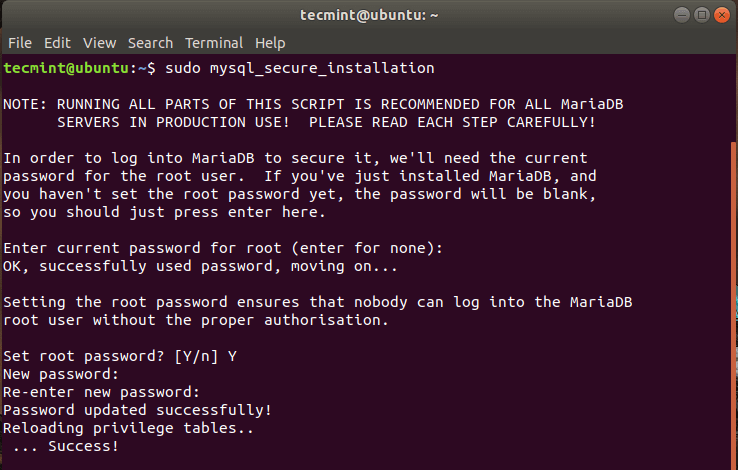
sudo mysql_secure_installation
Hit ENTER when
prompted for the root password and press ‘Y’ to set the root password.
 https://www.tecmint.com/wp-content/uploads/2020/03/Set-MySQL-Password-in-Ubuntu.png
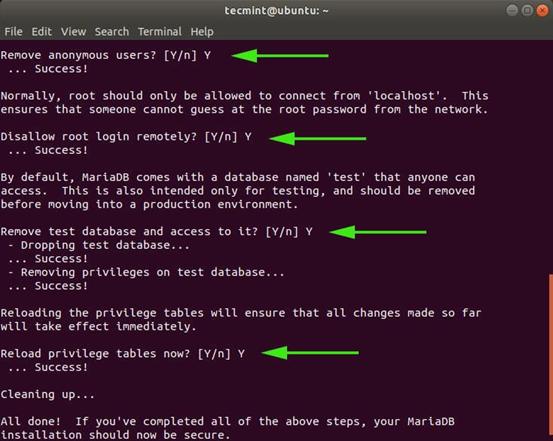
For the remaining prompts, simply type ‘Y’ and hit ENTER.
Step 4: Create an OwnCloud
Database
sudo mysql -u root -p
MariaDB [(none)]> CREATE DATABASE owncloud_db;
MariaDB [(none)]> GRANT ALL ON owncloud_db.* TO 'owncloud_user'@'localhost' IDENTIFIED BY 'StrongP@ssword';
MariaDB [(none)]> FLUSH PRIVILEGES;
MariaDB [(none)]> EXIT;
-----修改
MariaDB [(none)]> CREATE
DATABASE owncloud;
MariaDB [(none)]> GRANT ALL
ON owncloud.* TO '6932'@'localhost' IDENTIFIED BY
'693227';
MariaDB [(none)]> FLUSH
PRIVILEGES;
MariaDB [(none)]> EXIT;
-----修改結束
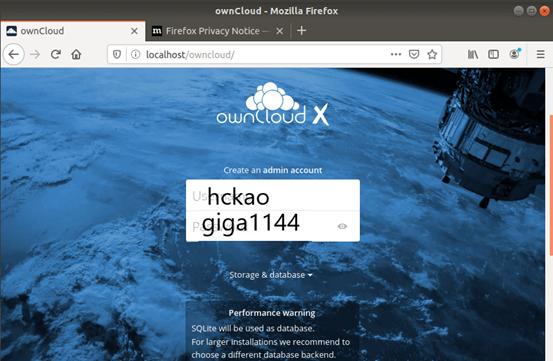
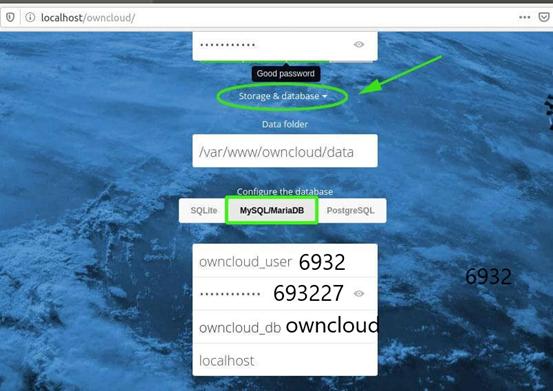
以下編輯 trust domin以免使用網域無法讀取
hckao@cloud:/var/www/owncloud/config$ sudo cat config.php
[sudo] password for hckao:
<?php
$CONFIG = array (
'instanceid' => 'oct1tlqasfgl',
'passwordsalt' => '1P80qKKPG2YYv1oE4ho+64g1yNjkTU',
'secret' => '6qltC9tI2IXzFh/n4HZMQpD49oB5DoxLiqFvja4sowut3jlh',
'trusted_domains' =>
array (
0 => 's912.ddns.net',
1 => '192.168.1.113',
),
'datadirectory' => '/var/www/owncloud/data',
'overwrite.cli.url' => 'http://s912.ddns.net/owncloud',
'dbtype' => 'mysql',
'version' => '10.4.0.4',
'dbname' => 'owncloud',
'dbhost' => 'localhost',
'dbtableprefix' => 'oc_',
'dbuser' => '6932',
'dbpassword' => '693227',
'logtimezone' => 'UTC',
'apps_paths' =>
array (
0 =>
array (
'path' => '/var/www/owncloud/apps',
'url' => '/apps',
'writable' => false,
),
1 =>
array (
'path' => '/var/www/owncloud/apps-external',
'url' => '/apps-external',
'writable' => true,
),
),
'installed' => true,
);
hckao@cloud:/var/www/owncloud/config$